Today, we're diving into one of the most useful and time-saving features in your design toolkit: duplicating objects.
Whether you're creating a perfectly aligned grid of stars, a repeating line of text, or just need another copy of that perfectly styled icon, the duplicate tool is your best friend. It ensures consistency and dramatically speeds up your workflow.
Let's explore the quick and easy ways to do it.Method 1: The Control Panel (The Quickest Way)
1: The Control Panel (The Quickest Way)
This is the go-to method when you're in the flow. Whenever you select an object on your canvas, a handy floating control panel appears at the top of your workspace.
Select Your Object: Click on any icon, shape, text box, or image on your canvas. You'll see a selection box appear around it, and the control panel will pop into view.
Find the Duplicate Icon: On the control panel, look for the duplicate icon. It looks like two overlapping squares
Click to Duplicate: Simply click this icon. Voilà! An identical copy of your object will instantly appear, slightly offset from the original.
Position Your New Object: You can now click and drag your new object anywhere you like on the canvas.
2: The Right-Click Menu
For those who prefer using a context menu, this method is just as simple.
Select Your Object: First, click on the object you wish to copy.
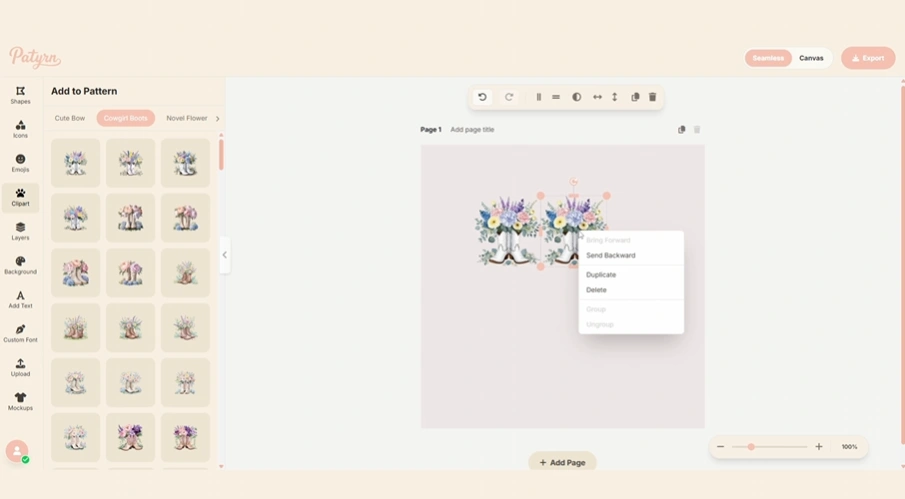
Right-Click: Right-click directly on the selected object. A context menu will appear with a list of actions.
Choose "Duplicate": Click on the "Duplicate" option in the menu.
Done! A new copy will be created, ready for you to position.
This method is especially useful if your hands are already on the mouse and you want to perform several actions from the same menu, like duplicating and then sending an object backward.Pro-Tip: Duplicating Multiple Objects at Once!
Need to copy an entire group of objects? No problem!
Select Multiple Objects: Hold down the Shift key on your keyboard and click on each object you want to include in your selection.
Duplicate: Use either the Control Panel icon or the Right-Click Menu method described above.
All at Once: Patyrn will create a copy of all selected objects, preserving their relative positions and styling. This is incredibly powerful for building complex arrangements quickly.
Creative Ways to Use Duplication
Create Perfect Rows: Duplicate an object, drag the copy to create the desired spacing, then select both objects and duplicate them again. You can create a full row in seconds!
Build Symmetrical Designs: Duplicate an object, and then use the "Flip Horizontal" or "Flip Vertical" buttons on the copy to create a mirrored element.
Maintain Text Consistency: Once you've perfected the font, size, and color of a text box, simply duplicate it for any new text you want to add. This keeps your design looking professional and consistent.
And that's all there is to it! Duplicating is a fundamental feature that, once mastered, will feel like a design superpower.