Hey there, pattern creators!
Hey Patyrn creators! Ready to add a splash of fun and personality to your designs? Today, we're exploring one of the most playful features in your creative toolkit emojis!
Emojis are the universal language of the digital world. They can add humor, emotion, and modern flair to your patterns, making them instantly relatable and eye-catching. Whether you're designing phone cases, wrapping paper, or social media backgrounds, emojis are a fantastic way to make your creations pop.
Let's dive in and learn how to sprinkle some emoji magic onto your canvas!
Step 1: Open the Emoji Panel
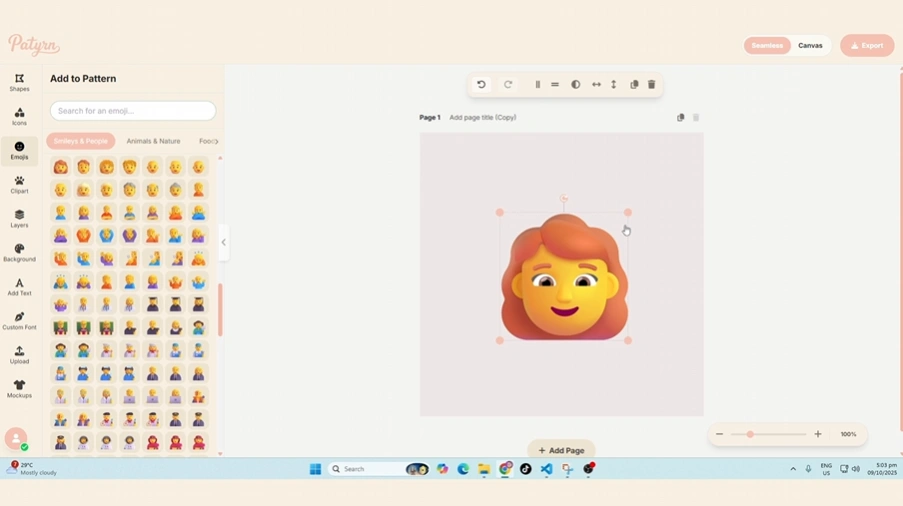
Your journey into the world of emojis starts on the main toolbar on the left side of your screen. Look for the smiley face icon
Clicking this button will slide open the Emoji Panel, your gateway to hundreds of expressive characters.
Step 2: Find the Perfect Emoji
We've packed the panel with every emoji you can think of, and we've made them easy to find. You have two main ways to browse:
By Category
At the top of the panel, you'll see a row of category tabs, such as:
Simply click on a category to view all the related emojis. If you don't see all the categories, use the arrow buttons to scroll through the list.
By Searching
Know exactly what you're looking for? The fastest way to find it is with the search bar at the top of the panel. Just type in a keyword like "heart," "cat," or "pizza," and the panel will instantly show you all the matching emojis.
Step 3: Add to Your Canvas
This is the easiest step of all! Once you've found the emoji you want to use, simply click on it.
The emoji will immediately appear in the center of your canvas, ready for you to position and style. You can add as many different emojis as you like to build up your pattern.
Pro Tip: Style Your Emojis
Once an emoji is on your canvas, it behaves just like any other shape! Select it, and you can use the Control Panel at the top or the Style Panel on the left to:
Combine different emojis, play with their sizes and rotations, and create a dynamic and fun-filled composition!
Conclusion
And there you have it! Adding emojis to your patterns is a quick and simple way to inject personality and charm into your work. They're perfect for creating lighthearted, trendy, and expressive designs that are sure to make people smile.
So go ahead, explore the emoji library and see what fun combinations you can come up with
Happy creating